
Miami Cruise / Apps / bat
bat
Readable syntax highlighting for source files, with Miami Cruise colours.
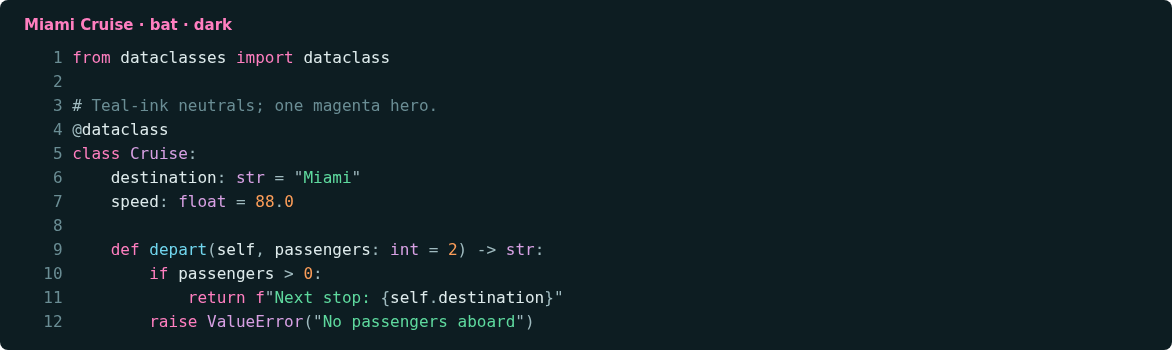
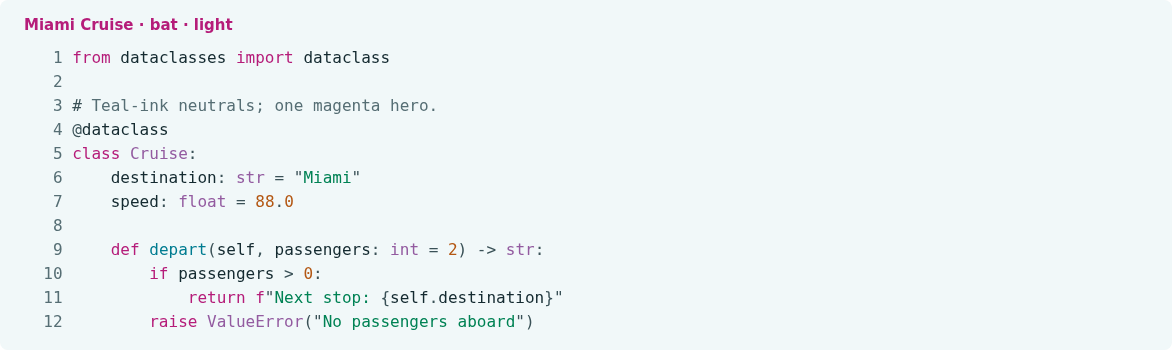
Install
Download
Download
miami-cruise-dark.tmThemeandmiami-cruise-light.tmTheme. Then open a terminal in the folder where they were saved (usuallyDownloads).curl -fsSLO https://lanjelin.github.io/miami-cruise/downloads/bat/miami-cruise-dark.tmTheme curl -fsSLO https://lanjelin.github.io/miami-cruise/downloads/bat/miami-cruise-light.tmThemeInstall the syntax themes
Install bat first (some Linux packages name the command
batcat). Use a true-colour terminal with the matching dark or light background. These commands use bat's own config directory and do not replace your config file.macOS / Linuxbat_dir="$(bat --config-dir)" mkdir -p "$bat_dir/themes" cp miami-cruise-dark.tmTheme miami-cruise-light.tmTheme "$bat_dir/themes/" bat cache --build bat --list-themesWindows (PowerShell)$batDir = bat --config-dir New-Item -ItemType Directory -Force "$batDir/themes" | Out-Null Copy-Item miami-cruise-dark.tmTheme, miami-cruise-light.tmTheme "$batDir/themes/" bat cache --build bat --list-themesIf files with these same names already exist, back them up before copying. To uninstall, remove just these two files from the themes directory and run
bat cache --buildagain. Existing unrelated themes are preserved.Choose a variant
bat --theme=miami-cruise-dark --color=always --paging=never build.pyUse
--theme=miami-cruise-lightfor light mode. Alternatively, after installing the themes and rebuilding the cache, select the default throughBAT_THEME:macOS / Linuxexport BAT_THEME="miami-cruise-dark"Windows (PowerShell)$env:BAT_THEME = "miami-cruise-dark"Use
miami-cruise-lightfor the light variant. These assignments affect the current shell and its child processes; add the appropriate assignment to your shell profile if you want it in new sessions. The variable selects an installed theme; it does not install or rebuild the syntax cache. An explicit command-line--themeoverrides this selection.If you prefer bat's own config file instead, add
--theme=miami-cruise-darkto the file reported bybat --config-file, preserving your other options. Choose one default-selection method rather than setting conflicting defaults.bat colours the output, not the terminal's background. Use the matching Miami Cruise terminal palette. This port does not automatically switch variants.
Install with an agent
Paste this prompt into an agent with web access and access to the machine where your apps run. No cloning, building or manual file downloads needed.
Help me install Miami Cruise. Read
https://raw.githubusercontent.com/lanjelin/miami-cruise/main/INSTALL.md
and follow its linked playbooks. Inspect and propose installation for bat only; ask which variant I want.
Download the selected files yourself from the project website or a pinned GitHub revision. Propose exact changes and wait for my approval before making changes. Include private backups and conflict-aware restoration instructions and scripts before applying changes.The agent inspects first and asks for approval. If it cannot access your machine, it can provide tailored commands instead. Read the installation and restoration guide.