
Miami Cruise / Apps / eza
eza
A true-colour file listing, from directories and permissions to Git status.
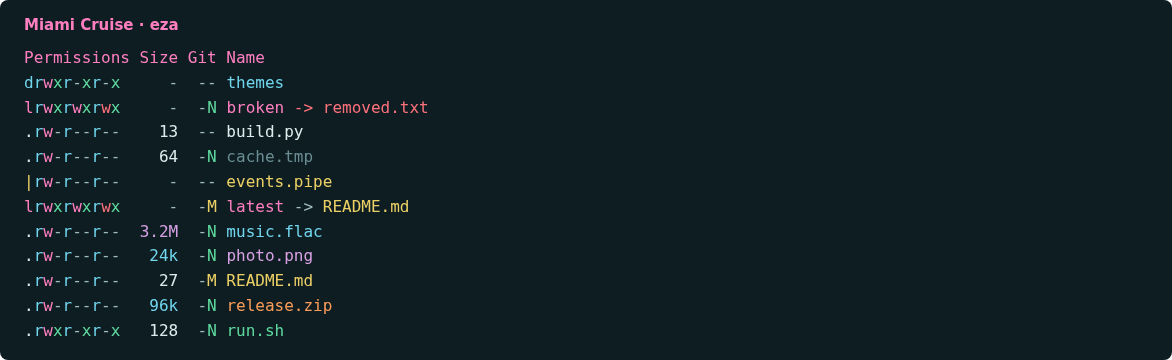
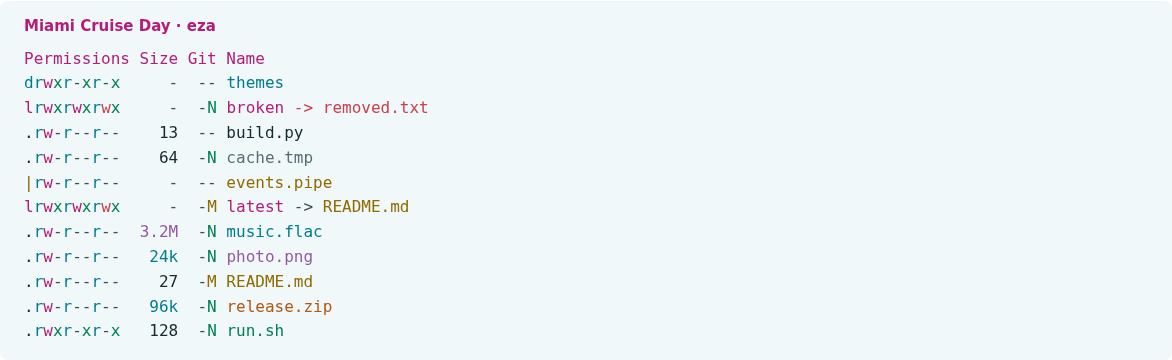
Install
Download
Download
miami-cruise-dark.ymlandmiami-cruise-light.yml. Then open a terminal in the folder where they were saved (usuallyDownloads).curl -fsSLO https://lanjelin.github.io/miami-cruise/downloads/eza/miami-cruise-dark.yml curl -fsSLO https://lanjelin.github.io/miami-cruise/downloads/eza/miami-cruise-light.ymlInstall a variant as theme.yml
Install eza first. Use a true-colour terminal with the matching Miami Cruise dark or light background; eza only colours the listing, not the terminal itself.
The commands below save an existing
theme.ymlastheme.yml.bakonce. If you have custom filename or icon rules, merge those into the new file afterwards.macOS / Linuxeza_dir="${EZA_CONFIG_DIR:-${XDG_CONFIG_HOME:-$HOME/.config}/eza}" mkdir -p "$eza_dir" if [ -f "$eza_dir/theme.yml" ] && [ ! -e "$eza_dir/theme.yml.bak" ]; then cp "$eza_dir/theme.yml" "$eza_dir/theme.yml.bak" fi cp miami-cruise-dark.yml "$eza_dir/theme.yml" export EZA_CONFIG_DIR="$eza_dir"Windows (PowerShell)$ezaDir = if ($env:EZA_CONFIG_DIR) { $env:EZA_CONFIG_DIR } else { Join-Path $env:APPDATA "eza" } New-Item -ItemType Directory -Force $ezaDir | Out-Null $theme = Join-Path $ezaDir "theme.yml" if ((Test-Path $theme) -and !(Test-Path "$theme.bak")) { Copy-Item $theme "$theme.bak" } Copy-Item miami-cruise-dark.yml $theme $env:EZA_CONFIG_DIR = $ezaDirFor light mode, use
miami-cruise-light.ymlinstead. eza readstheme.ymlon each invocation; it has no automatic dark/light switch.On macOS the native default config location may differ from Linux. The explicit
EZA_CONFIG_DIRabove makes the location unambiguous. Keep that variable in your shell profile if using this location on macOS or a custom location on any platform.Keep the config directory in your environment
EZA_CONFIG_DIRselects the directory containingtheme.yml, not a theme filename. The install commands above already export it for the current shell. For the same default location in new sessions, add the appropriate assignment to your shell profile:macOS / Linuxexport EZA_CONFIG_DIR="${XDG_CONFIG_HOME:-$HOME/.config}/eza"Windows (PowerShell)$env:EZA_CONFIG_DIR = Join-Path $env:APPDATA "eza"If you installed into a custom directory, use that directory instead. Keep any existing
EZA_CONFIG_DIRchoice consistent with where you copied the theme. Changing this variable does not install a theme or select a variant by name; copy the chosen dark or light file totheme.ymlin that directory.Try it without colour overrides
macOS / Linuxenv -u LS_COLORS -u EZA_COLORS -u EXA_COLORS eza --long --git --color=alwaysWindows (PowerShell)eza --long --git --color=alwaysLS_COLORSandEZA_COLORSoverride theme colours. LegacyEXA_COLORSis used whenEZA_COLORSis unset. Remove conflicting settings from your shell configuration if you want the full palette. Icons are optional and need a Nerd Font; their glyphs are left at eza's defaults.Theme format and configuration reference: https://github.com/eza-community/eza/blob/main/man/eza_colors-explanation.5.md
Install with an agent
Paste this prompt into an agent with web access and access to the machine where your apps run. No cloning, building or manual file downloads needed.
Help me install Miami Cruise. Read
https://raw.githubusercontent.com/lanjelin/miami-cruise/main/INSTALL.md
and follow its linked playbooks. Inspect and propose installation for eza only; ask which variant I want.
Download the selected files yourself from the project website or a pinned GitHub revision. Propose exact changes and wait for my approval before making changes. Include private backups and conflict-aware restoration instructions and scripts before applying changes.The agent inspects first and asks for approval. If it cannot access your machine, it can provide tailored commands instead. Read the installation and restoration guide.