
Miami Cruise / Apps / Glow
Glow
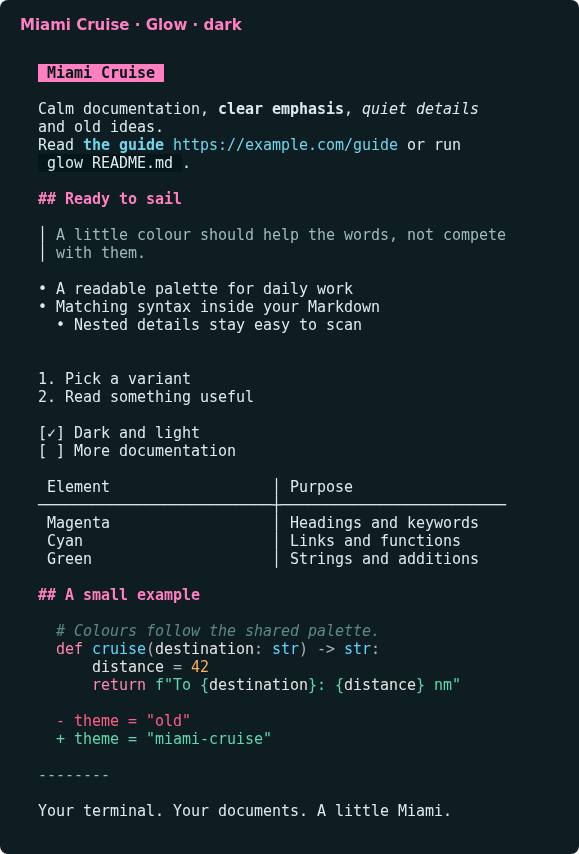
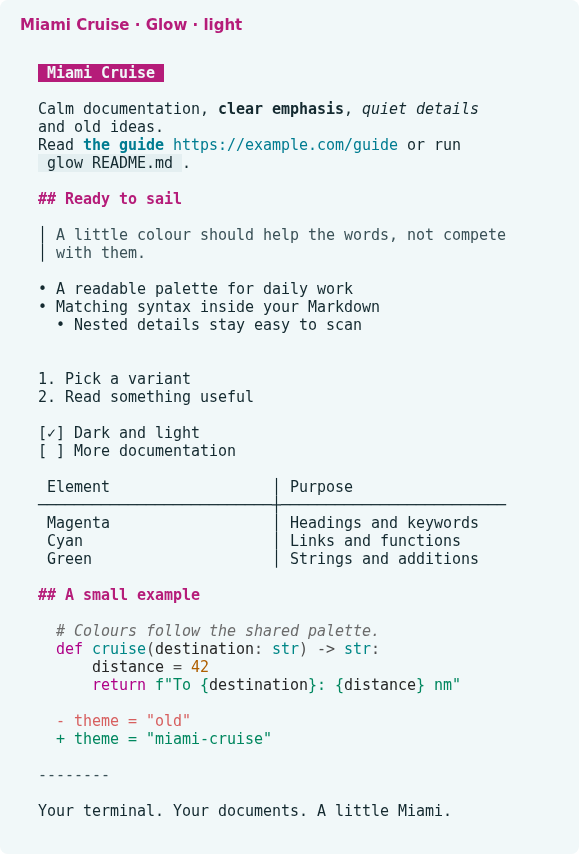
Readable Markdown, magenta headings and matching code syntax in your terminal.
Install
Download
Download
miami-cruise-dark.jsonandmiami-cruise-light.json. Then open a terminal in the folder where they were saved (usuallyDownloads).Native Glamour JSON styles for rendered Markdown, not replacement glow.yml files. Glow itself is unmodified. Browser lists, help bars and pager chrome retain their built-in colours. These files do not change keybindings, paging, wrapping or file discovery.
curl -fsSLO https://lanjelin.github.io/miami-cruise/downloads/glow/miami-cruise-dark.json curl -fsSLO https://lanjelin.github.io/miami-cruise/downloads/glow/miami-cruise-light.jsonTry a Markdown style
Install Glow and use a true-colour terminal with a matching dark or light background. Keep these JSON files in a permanent folder. Back up same-named customized files before copying. There is no bat dependency, syntax-cache build or patched Glow binary.
Linux / macOSmkdir -p ~/.config/glow/styles cp miami-cruise-*.json ~/.config/glow/styles/ glow -s "$HOME/.config/glow/styles/miami-cruise-dark.json" README.mdWindows (PowerShell)$styles = Join-Path $env:APPDATA "glow/styles" New-Item -ItemType Directory -Force $styles | Out-Null Copy-Item miami-cruise-*.json $styles glow -s (Join-Path $styles "miami-cruise-dark.json") README.mdChoose dark or light to match your terminal. Each style paints the Miami Cruise palette background for Markdown body and fenced code, with accent fills on inline code and first-level headings. Glow has no separate background toggle in glow.yml: switch the style path to choose the other file. Its built-in auto selection does not switch between custom files.
Markdown body colours (headings, links, quotes, tables) render true-colour. Fenced-code syntax highlighting goes through Chroma's terminal256 formatter, so those colours are quantized to the nearest of 256 terminal colours and can look very slightly off from the exact palette hex.
Keep your current Glow settings
For persistence, edit only the style key in your existing glow.yml, preserving pager, width, mouse and other settings. Run glow --help to find your platform's config path, or glow config to open it. Use the actual absolute JSON path; the example below must be adapted to your machine.
style: "/absolute/path/to/miami-cruise-dark.json"This is a complete Markdown stylesheet, not a merge with another custom stylesheet. Familiar heading prefixes, list markers, quote bars and emphasis are included. Glow's -s flag overrides the style key. Keep your existing width and paging preferences; the theme does not set them.
Linux / macOS# Optional one-off width, without editing config: glow -s "$HOME/.config/glow/styles/miami-cruise-light.json" -w 80 README.mdScope and removal
The same Markdown style can be used when reading documents in Glow's TUI. It does not theme the file browser, search/list selection, status/help bars or other application chrome. No upstream patch or custom Glow build is involved.
To uninstall, restore your previous style key (or remove it to use Glow's default auto style) and stop passing this JSON path via -s. Then remove only the two Miami Cruise JSON files. Other Glow settings stay intact.
Tested with Glow 3.0.0 on Linux. The JSON format is Glamour's native Markdown styling API; older versions and other platforms are not verified. Reference: https://github.com/charmbracelet/glow#styles
Install with an agent
Paste this prompt into an agent with web access and access to the machine where your apps run. No cloning, building or manual file downloads needed.
Help me install Miami Cruise. Read
https://raw.githubusercontent.com/lanjelin/miami-cruise/main/INSTALL.md
and follow its linked playbooks. Inspect and propose installation for Glow only; ask which variant I want.
Download the selected files yourself from the project website or a pinned GitHub revision. Propose exact changes and wait for my approval before making changes. Include private backups and conflict-aware restoration instructions and scripts before applying changes.The agent inspects first and asks for approval. If it cannot access your machine, it can provide tailored commands instead. Read the installation and restoration guide.