
Miami Cruise / Apps / tmux
tmux
Miami Cruise colours for your existing tmux layout.
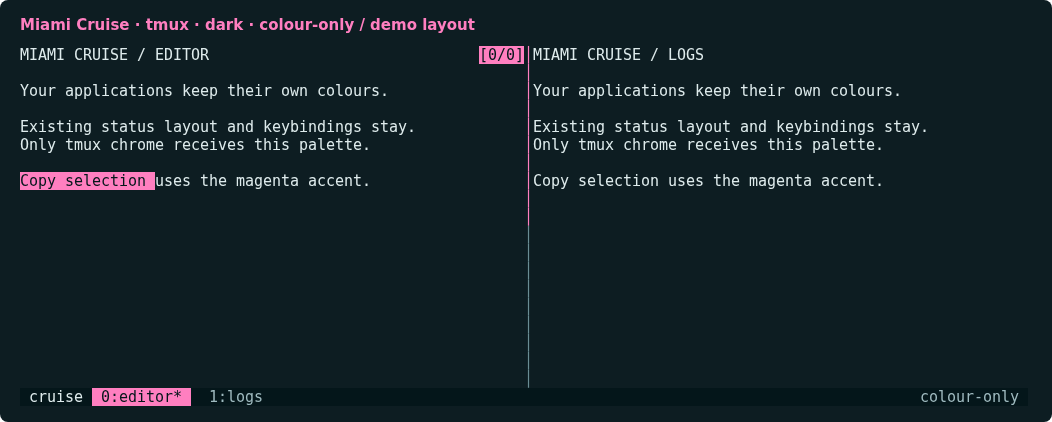
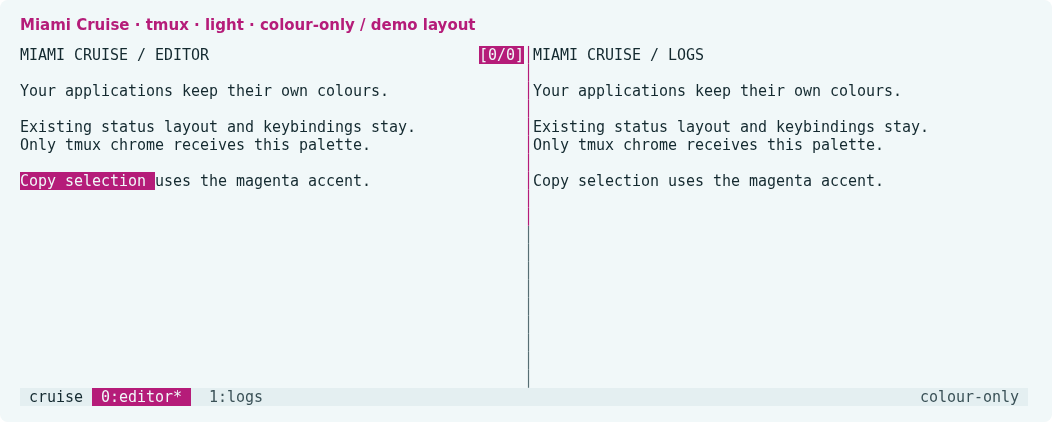
Install
Download
Download
miami-cruise-dark.confandmiami-cruise-light.conf. Then open a terminal in the folder where they were saved (usuallyDownloads).Colour-only tmux command files, not replacement configs or TPM plugins. No status formats, segments, separators, lengths, positioning, bindings, hooks or shell commands. Existing text attributes are merged rather than reset. Applications inside panes keep their own colours.
curl -fsSLO https://lanjelin.github.io/miami-cruise/downloads/tmux/miami-cruise-dark.conf curl -fsSLO https://lanjelin.github.io/miami-cruise/downloads/tmux/miami-cruise-light.confLoad colours without replacing your config
Requires tmux 3.4 or newer and a true-colour terminal. Copy the files into a permanent folder. Back up any same-named customized files first. Do not replace your existing tmux config.
Linux / macOSmkdir -p ~/.config/tmux/themes cp miami-cruise-dark.conf miami-cruise-light.conf ~/.config/tmux/themes/ # Try it in the current tmux server: tmux source-file ~/.config/tmux/themes/miami-cruise-dark.confTo persist it, add this line after your existing theme/plugin initialization and colour settings in your current tmux config. Use light instead of dark for the light variant. There is no automatic switching.
source-file ~/.config/tmux/themes/miami-cruise-dark.confThe file does not change terminal-features, default-terminal or terminal-overrides. Keep your existing true-colour capability configuration. Lower-colour clients may quantize the palette.
Keep your powerline bar
Your status-left, status-right, status-format, window formats, icons and powerline separators are left byte-for-byte unchanged. This is not a new status-bar design. The screenshots use a disposable demonstration layout which is not included in the downloaded theme.
Inline colour directives such as #[fg=...,bg=...] in an existing powerline format override these base styles. Plugin-generated colours and local session/window styles can also take precedence. The port deliberately does not rewrite those strings or remove local overrides. Not every segment of an existing theme will automatically recolour.
For those segments, use your current theme/plugin palette settings and the Miami Cruise tokens: accent for the active segment, on-accent for its text, panel for the bar background, and text/muted for labels. Change only its colour values; keep its format and separator structure. The exact mapping depends on the theme/plugin you use.
A plugin that reapplies its colours later can override this file. Source the file after that initialization or configure the plugin colours directly. This port does not add hooks to compete with it.
Switch or remove
Linux / macOStmux source-file ~/.config/tmux/themes/miami-cruise-light.confTo uninstall, remove the source-file line and reload your original theme/config so it restores the affected colours. Deleting the file alone does not undo styles already loaded in a running server. For styles your old config never sets, fresh tmux servers will use the normal defaults; do not kill a server containing work just to reset colours.
Native style and option reference: https://github.com/tmux/tmux/blob/3.4/tmux.1
Install with an agent
Paste this prompt into an agent with web access and access to the machine where your apps run. No cloning, building or manual file downloads needed.
Help me install Miami Cruise. Read
https://raw.githubusercontent.com/lanjelin/miami-cruise/main/INSTALL.md
and follow its linked playbooks. Inspect and propose installation for tmux only; ask which variant I want.
Download the selected files yourself from the project website or a pinned GitHub revision. Propose exact changes and wait for my approval before making changes. Include private backups and conflict-aware restoration instructions and scripts before applying changes.The agent inspects first and asks for approval. If it cannot access your machine, it can provide tailored commands instead. Read the installation and restoration guide.