
Miami Cruise / Apps / Yazi
Yazi
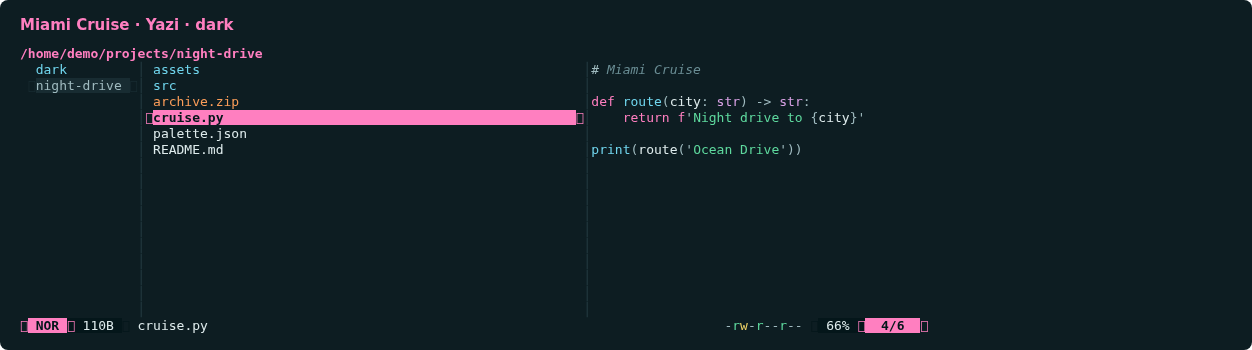
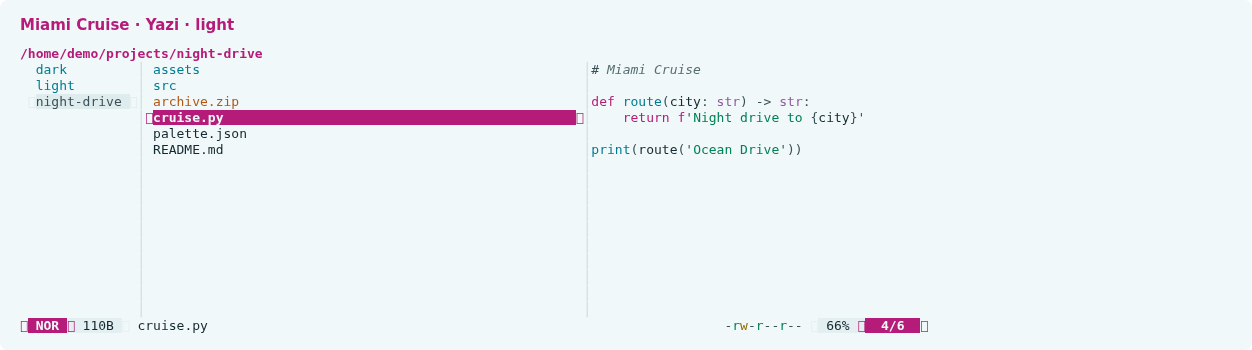
A calm file manager with magenta focus and matching code previews.
Install
Download
Download
miami-cruise-dark.yazi.tar.gzandmiami-cruise-light.yazi.tar.gz. Then open a terminal in the folder where they were saved (usuallyDownloads).Each tar.gz archive contains a native Yazi flavor and its matching code-preview syntax palette. No plugins, keymaps, file openers or layout settings are changed. Icons retain Yazi's default glyphs and colours.
curl -fsSLO https://lanjelin.github.io/miami-cruise/downloads/yazi/miami-cruise-dark.yazi.tar.gz curl -fsSLO https://lanjelin.github.io/miami-cruise/downloads/yazi/miami-cruise-light.yazi.tar.gzInstall the two flavors
Install Yazi first. Extract both tar.gz archives into your Yazi
flavorsdirectory. Each archive contains onemiami-cruise-*.yazifolder withflavor.tomlandtmtheme.xmlinside. The examples usetar, available on macOS, modern Windows and most Linux systems. Keep any existing Yazi configuration and back up same-named custom flavors before replacing them.Linux / macOSyazi_dir="${YAZI_CONFIG_HOME:-${XDG_CONFIG_HOME:-$HOME/.config}/yazi}" mkdir -p "$yazi_dir/flavors" tar -xzf miami-cruise-dark.yazi.tar.gz -C "$yazi_dir/flavors" tar -xzf miami-cruise-light.yazi.tar.gz -C "$yazi_dir/flavors"Windows (PowerShell)$yaziDir = if ($env:YAZI_CONFIG_HOME) { $env:YAZI_CONFIG_HOME } else { Join-Path $env:APPDATA "yazi/config" } New-Item -ItemType Directory -Force "$yaziDir/flavors" | Out-Null tar -xzf miami-cruise-dark.yazi.tar.gz -C "$yaziDir/flavors" tar -xzf miami-cruise-light.yazi.tar.gz -C "$yaziDir/flavors"Select dark and light in your existing theme.toml
Add or update these two entries in the existing
[flavor]section oftheme.tomlin your Yazi config directory. If there is no file or section yet, create one. Preserve all other sections and avoid a duplicate[flavor]header.[flavor] dark = "miami-cruise-dark" light = "miami-cruise-light"Start Yazi in a true-colour terminal with a matching dark or light background. Yazi chooses the flavor from the terminal's colour scheme on startup; this is not tied to your desktop setting. If your terminal cannot report its scheme, select just one variant for both entries.
The flavor styles Yazi's UI and text/code previews. Image previews, external previewers and applications launched from Yazi keep their own colours. It does not set the terminal background.
Switch or remove
To switch manually, set both
darkandlightto the desired flavor name, then restart Yazi. To remove it, restore your previous[flavor]entries (or remove only these two) and delete the two Miami Cruise flavor folders. Other Yazi settings stay untouched.Native flavor format and configuration: https://yazi-rs.github.io/docs/flavors/overview/
Install with an agent
Paste this prompt into an agent with web access and access to the machine where your apps run. No cloning, building or manual file downloads needed.
Help me install Miami Cruise. Read
https://raw.githubusercontent.com/lanjelin/miami-cruise/main/INSTALL.md
and follow its linked playbooks. Inspect and propose installation for Yazi only; ask which variant I want.
Download the selected files yourself from the project website or a pinned GitHub revision. Propose exact changes and wait for my approval before making changes. Include private backups and conflict-aware restoration instructions and scripts before applying changes.The agent inspects first and asks for approval. If it cannot access your machine, it can provide tailored commands instead. Read the installation and restoration guide.