
Miami Cruise / Apps / zsh-autosuggestions
zsh-autosuggestions
Readable, muted suggestions that leave your prompt in charge.
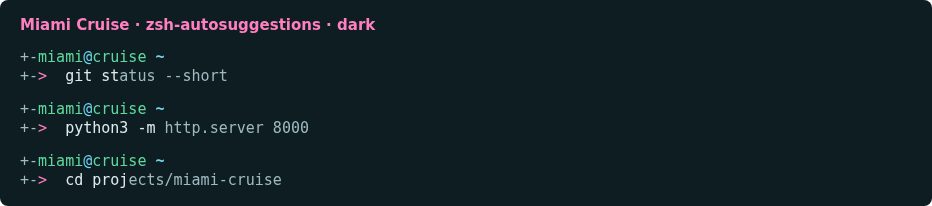
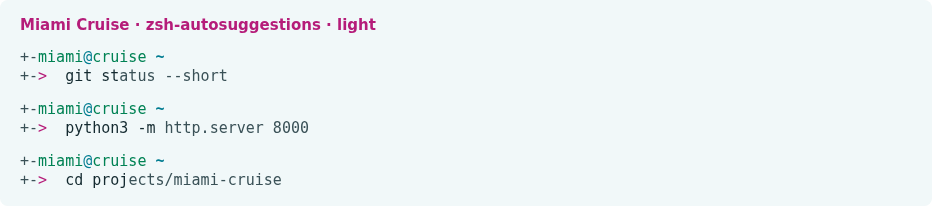
Install
Download
Download
miami-cruise-dark.zshandmiami-cruise-light.zsh. Then open a terminal in the folder where they were saved (usuallyDownloads).Requires zsh-autosuggestions, not bundled. Works with any prompt, including Miami Cruise Zsh. Does not install the plugin or change history, strategies, bindings, hooks or widgets.
curl -fsSLO https://lanjelin.github.io/miami-cruise/downloads/zsh_autosuggestions/miami-cruise-dark.zsh curl -fsSLO https://lanjelin.github.io/miami-cruise/downloads/zsh_autosuggestions/miami-cruise-light.zshSave the style files
Install zsh-autosuggestions with your existing plugin manager first. Save these downloads in a permanent directory; back up existing same-named files.
Linux / macOSmkdir -p ~/.config/zsh/themes cp miami-cruise-dark.zsh miami-cruise-light.zsh ~/.config/zsh/themes/Source your chosen variant
Add this line once to your existing .zshrc (or $ZDOTDIR/.zshrc), after plugin initialization and other suggestion styles. Use your actual path if XDG_CONFIG_HOME differs. For deferred plugin loading, apply it after the deferred initialization.
source ~/.config/zsh/themes/miami-cruise-dark.zshUse miami-cruise-light.zsh for light mode. Source the file in the current shell to try it, then type a prefix from your history. Requires true-colour ZLE support for exact colours. No automatic appearance switching.
Restore
Remove the source line and restore any previous ZSH_AUTOSUGGEST_HIGHLIGHT_STYLE assignment and replaced files. Start a fresh shell. In a running shell, restore the old value explicitly, or unset ZSH_AUTOSUGGEST_HIGHLIGHT_STYLE to use the plugin default; deleting files alone cannot reset shell variables.
Native style reference: https://github.com/zsh-users/zsh-autosuggestions#suggestion-highlight-style
Install with an agent
Paste this prompt into an agent with web access and access to the machine where your apps run. No cloning, building or manual file downloads needed.
Help me install Miami Cruise. Read
https://raw.githubusercontent.com/lanjelin/miami-cruise/main/INSTALL.md
and follow its linked playbooks. Inspect and propose installation for zsh-autosuggestions only; ask which variant I want.
Download the selected files yourself from the project website or a pinned GitHub revision. Propose exact changes and wait for my approval before making changes. Include private backups and conflict-aware restoration instructions and scripts before applying changes.The agent inspects first and asks for approval. If it cannot access your machine, it can provide tailored commands instead. Read the installation and restoration guide.